
Cookbook Recipes & Meal Plans
Riafy TechnologiesFood & Drink
4.51.91K Reviews
- Version
- Varies With Device
- Installs
- 5.00M
- Age Rating
- Teen
Screenshots
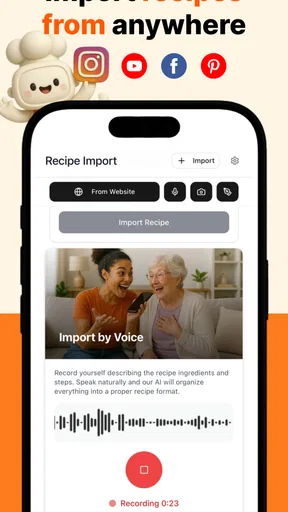
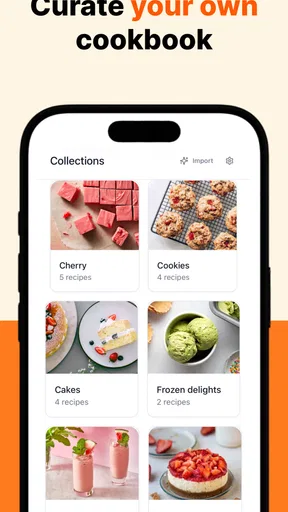
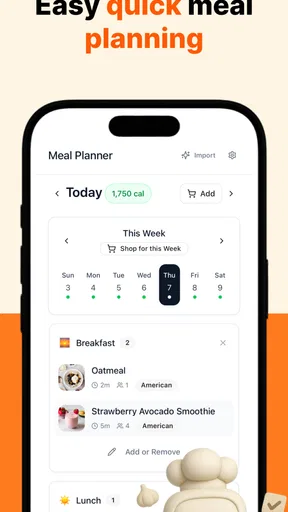
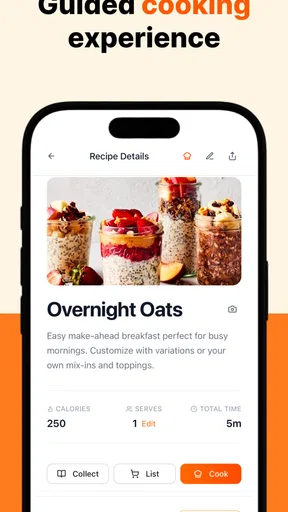
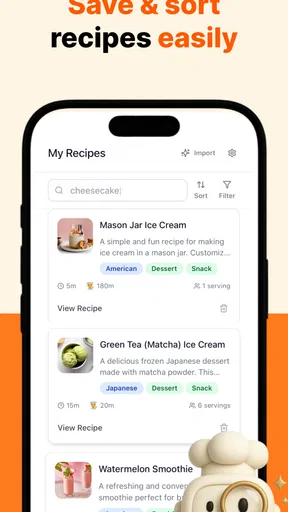
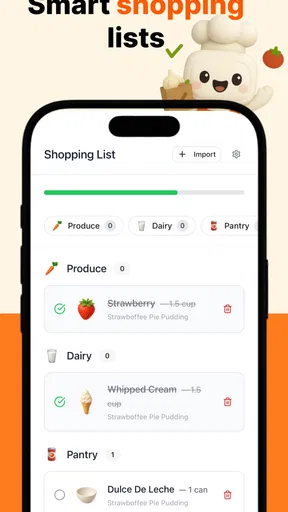
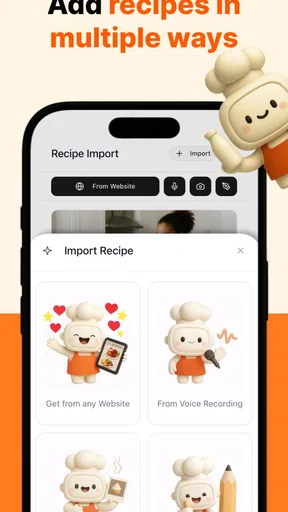

Our Review of Cookbook Recipes & Meal Plans
 Analysis by Appyee
When I need dinner ideas, I don’t always want to search recipe sites, compare several versions, and then figure out what to buy. Cookbook Recipes & Meal Plans is aimed at that everyday gap: it brings recipes and planning together so I can move from “what sounds good?” to a workable meal with less fuss. It’s a Food & Drink app from Riafy Technologies, and its appeal is practical rather than chef-like. I see it as a useful source of inspiration and structure, not a substitute for checking ingredients, adapting recipes, or learning the basics of cooking.
What the app is best at
The strongest case for this cookbook is the way it connects browsing with meal planning. A recipe collection can be entertaining but still leave the hardest task untouched: deciding what to cook several days in a row. Planning meals and turning that plan into a shopping list can help make that decision more concrete. I’d use that workflow before a grocery trip, when I have time to think through the week rather than shopping hungry and buying ingredients without a plan.
The ingredient search idea is useful for a different reason. Instead of treating leftovers as a separate problem, I can start with what is already in the fridge and look for a dish that might use it. That is a small shift, but it can make cooking feel less like following a fixed menu and more like making sensible use of what I have. For best results, I’d enter the ingredients that need using soon first, then treat the suggestions as starting points rather than a promise that every item will be used.
A practical way to use it during the week
Imagine getting home late with chicken, vegetables, and a few pantry staples to hand. I’d check the ingredient-based suggestions before opening a delivery app or buying more food, then choose a recipe that fits the time and effort I have available. If the result looks appealing, I’d check the directions and make sure I have the less obvious ingredients before committing. That quick check matters: a recipe can match the main ingredients while still calling for a sauce, seasoning, or cooking step I wasn’t expecting.
For a more organized week, I’d plan only the meals I realistically expect to cook. A meal plan that assumes every evening will be calm can become another chore when plans change. Leaving room for leftovers or an unplanned night makes the shopping list more useful, and gives ingredients a better chance of being used. I would also review the list before shopping instead of treating it as final: remove anything already in the cupboard and check whether a listed ingredient is needed in multiple meals.
How it compares with other recipe options
Compared with searching the web for a single recipe, a dedicated cookbook app can make browsing feel more contained and can connect an idea to a weekly plan. That is the main advantage I’d look for here. General search is still better when I want a very specific dish, an unusual regional preparation, or several independent versions to compare. A food creator’s website may also offer more personal context and detailed technique for a specialty recipe.
Compared with a simple notes app or a paper cookbook, this app is more helpful when I want suggestions and planning tools in one place. The trade-off is that a digital collection can encourage me to keep browsing when I should be cooking, and a generated shopping list still needs human judgment. I wouldn’t rely on it as an exact inventory system or assume that a suggested dish will perfectly match my tastes. Its role is to reduce the blank-page problem, not to make every kitchen decision for me.
It has an average rating of 4.4 from around 63,000 ratings, and it has been installed over 5 million times. Those figures suggest that many people find the general recipe-and-planning approach worthwhile, though they don’t tell me whether a particular recipe will suit my household. It is free to download, with in-app purchases ranging from $0.49 to $59.99 per item. I’d begin with the free experience and decide whether any paid option is worthwhile only after seeing how often I actually use the app.
Where I’d be cautious
Meal planning works best when the recipes fit the cook’s real habits. If I have strict dietary needs, I would inspect each recipe and ingredient list rather than assume a dietary preference setting makes every suggestion suitable. The same goes for allergies: a recipe suggestion is not a safety check, and ingredient labels and possible substitutions deserve careful attention. Anyone following a medically prescribed diet should rely on their clinician’s guidance, not an app’s recipe categories.
There is also a difference between a recipe that looks inviting and one that is easy to execute. Photos can help me understand the intended result, and step-by-step directions can make an unfamiliar dish feel less intimidating, but they don’t guarantee that the timing or technique will suit every kitchen. I’d read the full recipe before starting, especially if I’m cooking for guests or working with an ingredient I rarely use. That habit helps avoid discovering halfway through that a dish needs more preparation than I have time for.
People who already have a dependable collection of recipes, a well-established meal-planning routine, or a preferred specialist cookbook may not gain much from adding another source. Likewise, if I mainly want restaurant recommendations, calorie tracking, or professional culinary instruction, this is not the tool I’d choose for those jobs. It is most convincing for someone who wants everyday meal ideas and a little help organizing them, rather than a deep course in cooking.
Who is likely to enjoy it?
I’d recommend trying it if you cook at home but regularly run out of ideas, want to make a shopping trip more deliberate, or are trying to use ingredients before they go to waste. It can also suit newer cooks who benefit from written steps and visual guidance, provided they are comfortable checking details and making small adjustments. Someone cooking for a household with different tastes may find the range of recipe styles helpful, though they’ll still need to choose meals everyone is willing to eat.
The app is marked for teens, so it is not presented as a children’s cooking product. For a young person learning to cook, the instructions may offer inspiration, but an adult should still supervise kitchen work involving knives, hot pans, or other hazards. That is ordinary kitchen caution, but it is especially worth keeping in mind when a screen makes a recipe look simpler than the hands-on work feels.
Released on September 5, 2013, the app has been around long enough to build a substantial audience, and its 1.9K reviews offer another place to get a sense of how people respond to it. I’d read comments with a specific question in mind, such as whether a recipe’s instructions were clear or whether a meal-planning workflow suited someone’s routine. Reviews can help set expectations, but I would not treat them as a replacement for checking a recipe myself.
My most useful tip is to treat planning as a flexible draft. Pick a few meals, check overlapping ingredients, and leave space for whatever the week brings. Then use the ingredient suggestions as a rescue option when plans change or produce needs attention. This approach makes the app more valuable than simply scrolling through recipes: it gives browsing a purpose while leaving room for real-life substitutions and appetites.
Getting Started with Ease
Diving into Cookbook Recipes & Meal Plans is like opening a beautifully illustrated cookbook that fits right in your pocket. The layout is clean and intuitive, making it super easy to navigate. From the get-go, the app asks about your dietary preferences. Whether you're vegan, gluten-free, or a full-on carnivore, there's something for everyone. I loved how the app tailors recipes based on what you enjoy eating.
Once you're set up, you can dive into a world of culinary delights. The app boasts a massive collection of recipes, from simple weekday meals to gourmet dishes that are perfect for impressing dinner guests. And if you're like me, always running on a tight schedule, the meal planning feature is a godsend.
Features That Make Life Easier
One of the standout features of this app is its meal planning capability. You can plan your meals for the week, and it even generates a shopping list for you. No more wandering aimlessly through the aisles – you’ll know exactly what you need. I found this particularly useful for sticking to a budget and reducing food waste.
Another nifty feature is the "What's in Your Fridge" option. Simply input the ingredients you have on hand, and the app suggests recipes you can make. It's like having a personal chef whispering tips in your ear. I tried it with some leftover chicken and veggies, and voila, I had a delightful stir-fry ready in no time.
Cooking with Confidence
Each recipe comes with step-by-step instructions, complete with photos and tips. It's perfect for both novice cooks and seasoned chefs. I appreciated the detailed guidance, which made trying new recipes less intimidating. And if you're someone who loves a good visual, the app's photography is top-notch, making every dish look enticing.
There's also a community aspect to the app. Users can rate and comment on recipes, providing a sense of camaraderie among home cooks. I found the feedback section helpful, especially when trying out a new dish. It's like getting advice from a friend who’s tried the recipe before.
Conclusion
All in all, Cookbook Recipes & Meal Plans is a fantastic app for anyone looking to spice up their cooking routine. With its vast array of recipes, user-friendly interface, and smart features, it simplifies meal planning and cooking in a fun and engaging way. Whether you're a kitchen novice or a seasoned gourmet, this app is sure to inspire your culinary creativity.
So, if you're ready to transform your meal times and impress your taste buds, give this app a try. Believe me, once you see how easy it is to create delicious meals with a little help from your virtual cookbook, you'll wonder how you ever cooked without it.
Verdict
Strengths of Cookbook Recipes & Meal Plans
- User-friendly interface simplifies navigation.
- Wide variety of recipes for all dietary needs.
- Customizable meal plans enhance user experience.
- Offline access available for saved recipes.
- Integration with grocery lists saves time.
Limitations of Cookbook Recipes & Meal Plans
- Limited free content; premium features locked.
- Occasional ads can disrupt the user experience.
- No option for family sharing on one account.
- Requires frequent updates for smooth operation.
- Some recipes lack detailed nutritional info.
Similar Picks in This Category
View All
Rappi: Food Delivery, Grocery
Rappi, Inc - Delivery3.5

McDonald’s: Cupons e Delivery
Arcos Dorados4.3

Swiggy: Food Instamart Dineout
Swiggy4.7

Blinkit: Groceries & more
Blinkit4.8

foodpanda: food & groceries
Foodpanda GmbH a subsidiary of Delivery Hero SE4.0

Zomato: Food Delivery & Dining
Zomato4.7
Frequently Asked Questions
What features does the Cookbook Recipes & Meal Plans app offer?
The Cookbook Recipes & Meal Plans app provides a wide array of features, including thousands of recipes from diverse cuisines, customizable meal plans, and a grocery list generator. Users can also enjoy cooking tips, nutritional information, and video tutorials to enhance their cooking experience. It's designed to cater to both novice and experienced cooks.
Is the Cookbook Recipes & Meal Plans app free to use?
The app offers a freemium model. Basic features, like access to a limited number of recipes and meal plans, are available for free. However, premium features, such as exclusive recipes, ad-free browsing, and personalized meal plans, require a monthly or yearly subscription. This flexibility allows users to choose based on their needs.
Can I use the app offline?
Yes, the Cookbook Recipes & Meal Plans app allows users to download recipes and meal plans for offline access. This is particularly useful when cooking in areas with limited internet connectivity. However, features like video tutorials and community forums require an internet connection to function properly.
How does the app help with dietary restrictions?
The app includes filters for various dietary needs, such as vegetarian, vegan, gluten-free, and keto diets. Users can set their preferences to receive tailored recipe recommendations. Additionally, it provides nutritional information, making it easier to manage specific dietary restrictions and ensure balanced meals.
Is there a community feature in the app?
Yes, the app has a vibrant community feature where users can share their own recipes, tips, and reviews. This interactive platform encourages users to engage with others, exchange ideas, and even ask for advice on cooking challenges. It’s a great way to connect with fellow cooking enthusiasts.
